Make the chaos visible.
Your team already says what they are doing on WhatsApp. Chaos turns it into one live picture of who is moving, who is stuck, and who has gone quiet. No standup. No spreadsheet. Nothing to install.
14 days · up to 10 people · no card
Runs inside WhatsApp No app for your team
Reads Ugandan English, Luganda, Swahili
Voice notes Say it instead of typing it
Made for offices of 20 to 40 people
The chaos
It is 09:28. 22 people on payroll. Nobody can point.
Ten WhatsApp groups. A spreadsheet from last Thursday. A 9:30 meeting where everyone repeats what they already typed. By 11:00 the boss still cannot say who is stuck, who is quiet, and who is simply at a client in Ntinda.
That is the real cost of the meeting: 25 people × 20 minutes × 22 working days is 183 person-hours a month spent saying things that were already written down, with no picture left at the end.
How it works
Say it once, on WhatsApp. Chaos files it.
- Your team messages Chaos. “Done: payroll export”, “stuck on the bank”, or a voice note. In a DM, in plain language.
- Chaos matches it to their own work. Clear match, it updates. Unsure, it asks which one. It never invents a duplicate.
- You open Chaos. Blockers, what finished today, who is silent, and the whole office as one map.
finished the Tororo manifest. UNBS still hasn’t released the Busia certificate
Tororo manifest: done. Busia certificate logged as a blocker. Sarah’s been told.
who else is stuck?
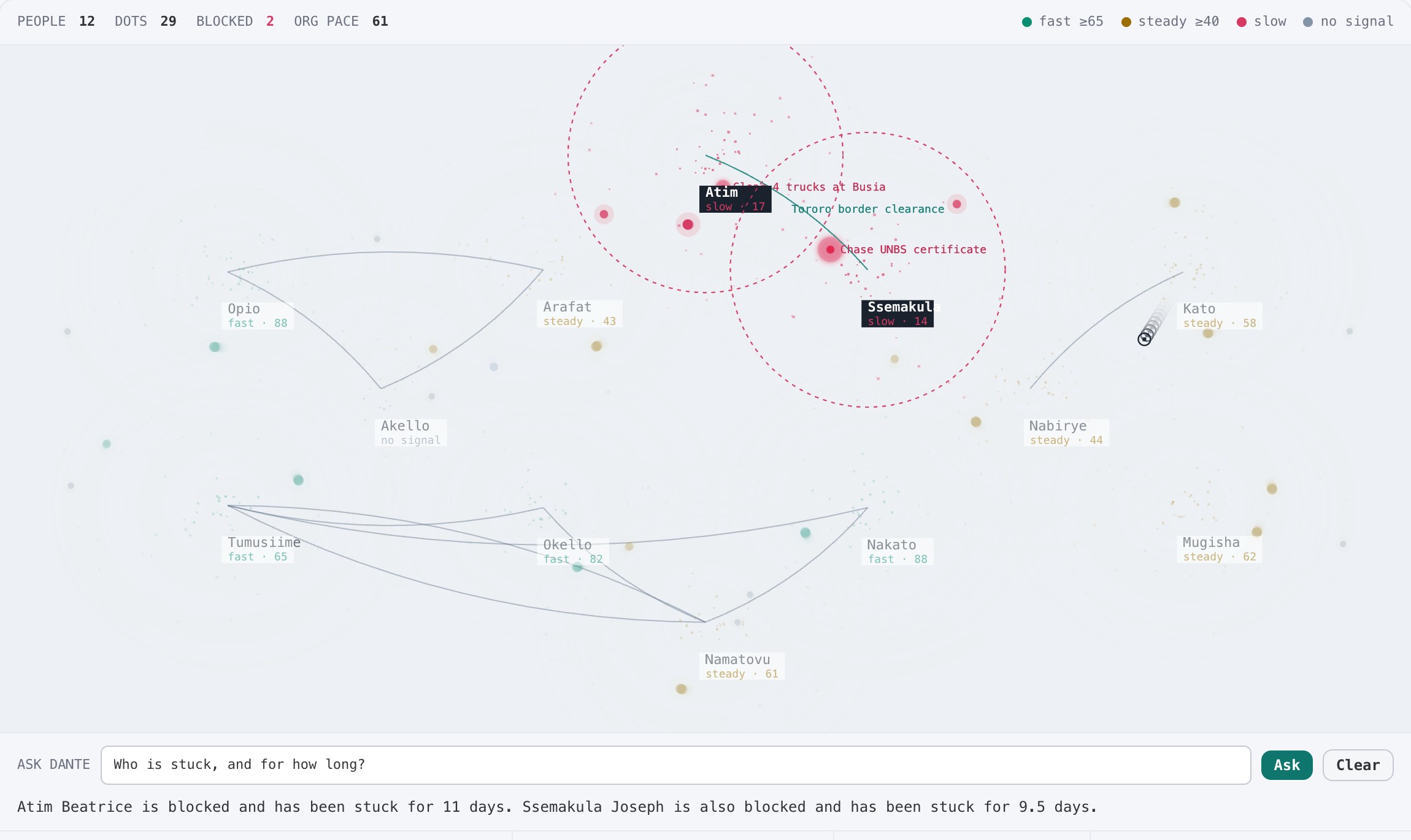
Atim. 11 days on the customs bond.
What you see
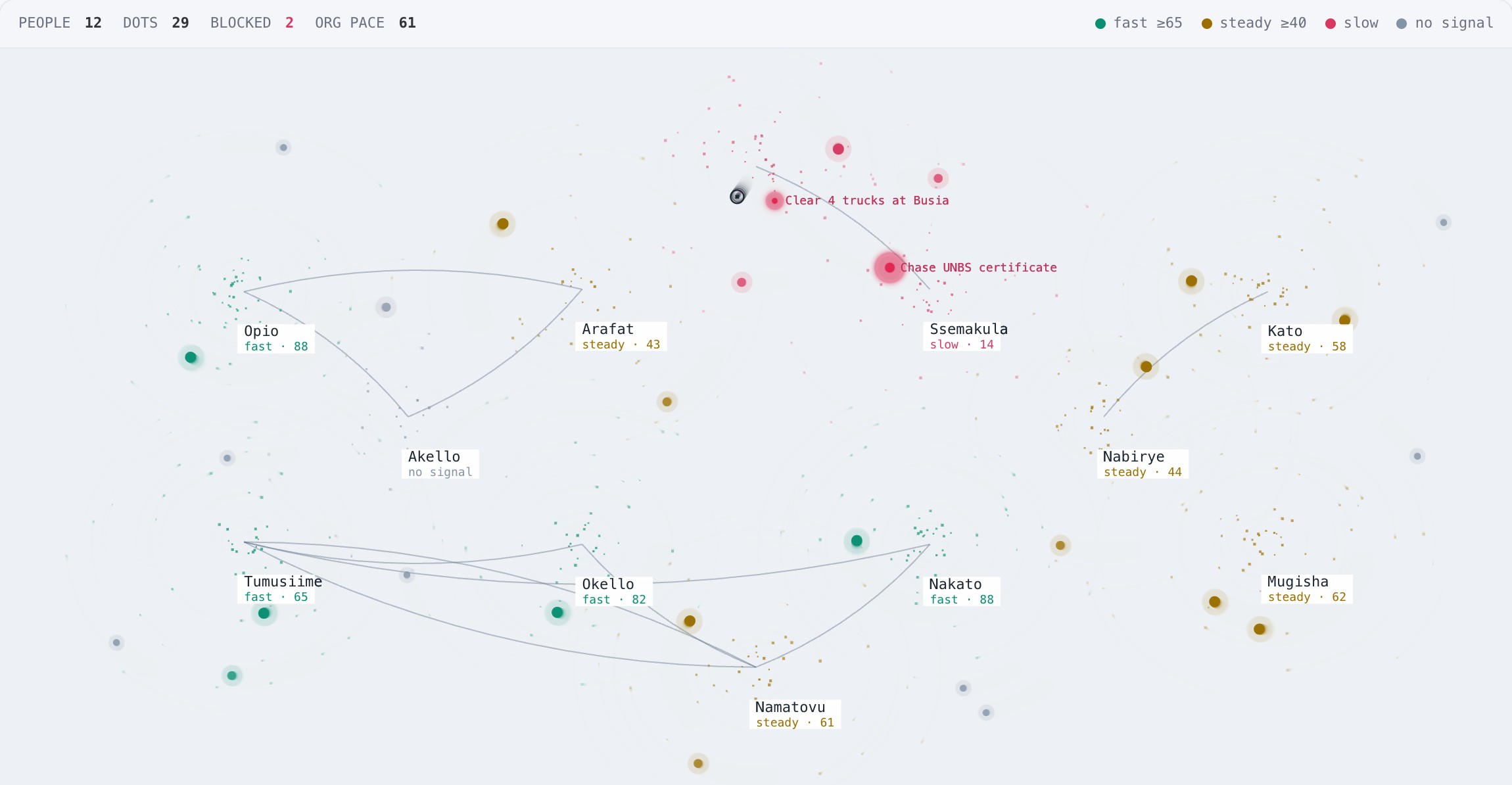
Every dot is a piece of work. Watch where it stops moving.
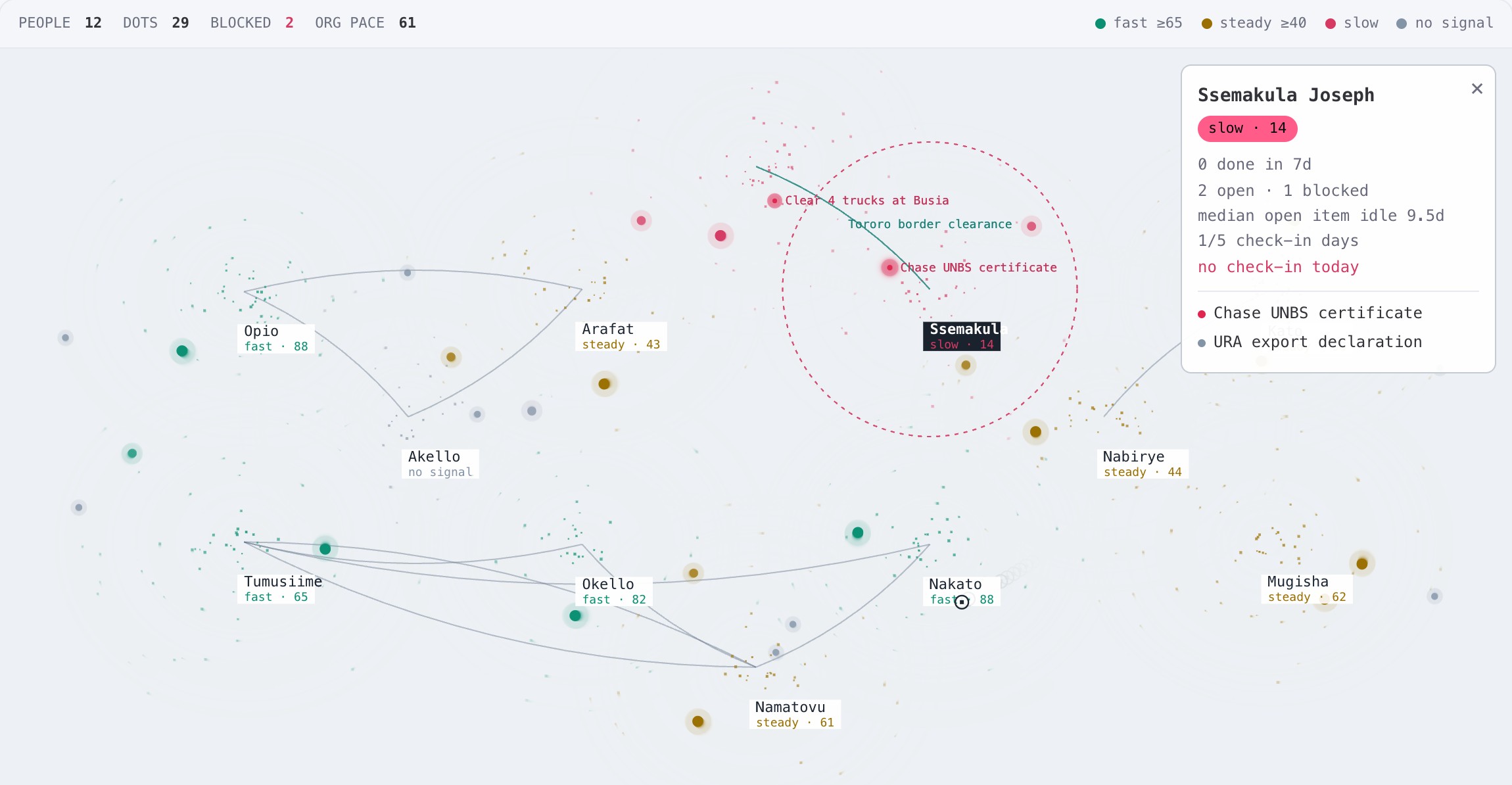
Clusters are people. Dots orbit fast when work is finishing and barely move when it is not. A red dot is blocked, with the reason beside it. Lines join people who share a project, so you can see who is waiting on whom.
Every morning
The answers you used to chase.
- Blockers, with their age
- Who is stuck, on what, and for how many hours. Resolve it from the same screen.
- Done today
- Finished work shows up because people said so on WhatsApp. No status meeting to extract it.
- Silence, chased once
- After the morning cutoff only people who have not checked in get a nudge. Nobody is chased twice.
- Leave-aware
- Connect Google Calendar and people on leave stop showing up as silent.
- Ask in plain language
- “Who is blocked on customs?” The map lights up the answer.
- Voice notes
- Send a voice note instead of typing. Chaos replies with what it heard so it can be corrected.
Fair by design
It measures work that moved, not people being watched.
Pace is built from what got finished, how long open work has sat, check-in days and blockers. Nothing about location, keystrokes or screen time. Someone who looks slow gets a private nudge first. You decide what happens next.
Plans by team size: trial 10 · starter 15 · growth 35 · scale 60. Paid plans are invoiced; contact us for pricing.
Questions
What managers ask first.
Does my team install anything?
No. They message Chaos on WhatsApp, the app they already have open all day. Only managers use the web screen.
Is this surveillance?
No. Chaos reads what people choose to tell it, the board, and leave from a connected calendar. Pace comes from work that moved, never from keystrokes or location. A slow dot gets a private nudge before anyone is chased.
What if Chaos gets a task wrong?
It only touches the sender’s own open work. When it is unsure it asks “which one?” instead of guessing, and it never creates a duplicate quietly.
Which languages?
Ugandan English, Luganda and Swahili messages are understood. Voice notes work too; Luganda voice is in testing with early teams.
Can we use our own WhatsApp number?
Trials use the shared Chaos number. Paid plans can connect your own WhatsApp Business number.
How do we pay?
By invoice. Talk to us and we set up your plan and seats. No card form during the trial.
See your office on a real Tuesday.
Add your team’s phones, ask them to message Chaos, and open Chaos at 09:30.
Start free trial14 days · up to 10 people · no card